
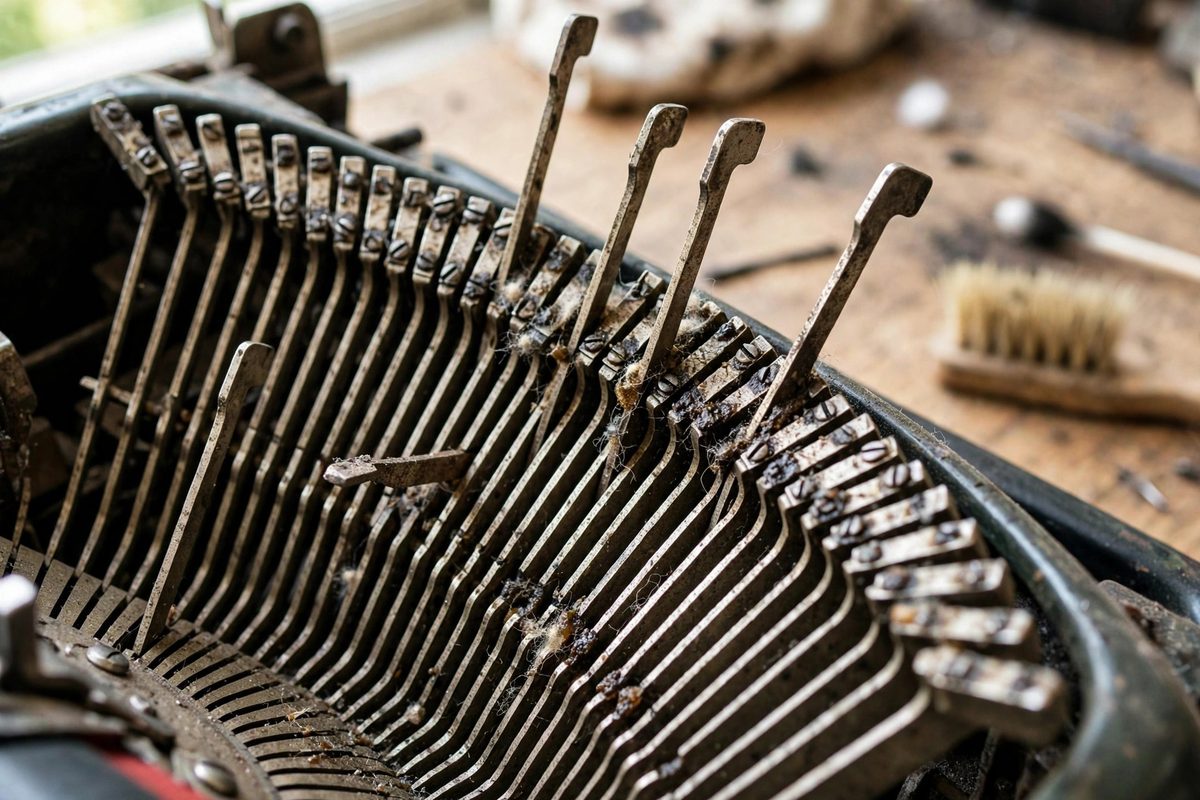
A typewriter whose typebars hesitate, stick halfway to the platen, or return lazily almost always suffers from gummed segment slots: the slotted guide (the segment) that each typebar pivots in has accumulated decades of dried oil, dust, and ribbon lint into a sticky varnish. The typebars themselves are usually fine; they are just swimming in glue. Cleaning the segment slots is the single most effective revival procedure for a sluggish machine, and it requires patience rather than parts.
Why the segment gums up
The segment is a curved, comb-like casting with a slot for each typebar, and each typebar pivots in its slot thousands of times per page. Decades ago, someone oiled this mechanism, because oil was the universal answer, and oil in a dust-rich environment becomes grinding paste, then varnish. Ribbon lint, paper dust, and airborne grime all migrate into the slots, and each adds to the drag. The symptom progression is characteristic: first the typebars feel slightly slow, then individual bars start sticking, then the machine becomes unusable as multiple bars hang in the type basket. Because the cause is contamination rather than wear, cleaning restores the original action completely; there is usually nothing to replace and nothing to adjust.
Cleaning method: solvent and mechanical action
The workhorse solvent is mineral spirits or a similar petroleum solvent: effective on old oil varnish, relatively gentle on the machine's finishes, and slow enough to work with. Apply it into the segment slots with a brush, an old toothbrush is the classic tool, working each slot individually and scrubbing the typebar pivots where they sit in the slots. Work the typebars through their motion as you clean; the movement helps the solvent reach the bearing surfaces. Wipe away the dissolved grime frequently with rags or cotton swabs, because dirty solvent redeposits its load. For stubborn varnish, let the solvent soak for several minutes before scrubbing, and repeat rather than escalating to aggressive chemicals. Avoid getting solvent on rubber parts like the platen and feed rollers, since petroleum solvents degrade rubber; mask or work carefully around them. Compressed air helps blow loosened debris out of the slots, but wear eye protection and work where the blowback will not coat the room.
The critical rule: do not re-oil the segment
Here is the mistake that undoes the whole job: oiling the segment after cleaning it. The segment is designed to run dry; the typebars pivot in their slots on clean metal, and any oil you add today becomes tomorrow's varnish. This is the original sin that gummed the machine in the first place. After cleaning, the segment gets nothing: no oil, no WD-40, no silicone spray. If a typebar still drags after thorough cleaning, the cause is a bent typebar or a mechanical obstruction, not a lack of lubrication, and adding oil only masks the real problem while restarting the gumming cycle. The only lubrication points on most typewriters are a few specific pivots called out in the service manual, applied sparingly with the correct light oil; the segment is never among them.
Checking typebar alignment after cleaning
With the action freed up, check that the typebars still strike correctly. Type each character and inspect: the type should land centered on the line, with even impression across the character. A typebar that was bent while stuck may now strike off-center or clash with its neighbors; gentle bending with typebar pliers, or careful finger pressure for small corrections, realigns it. Check for bars that still hesitate: a single sluggish bar after a full cleaning usually has a bent pivot or a damaged slot, and it deserves individual attention rather than another round of solvent on the whole segment. Test with all characters, including the shift positions, since some problems only appear in shifted type.
Ongoing care
Keep the machine covered when not in use; most segment contamination arrives as airborne dust settling into the open type basket. Blow out the segment with compressed air periodically, dry, no solvents needed for maintenance. Resist the urge to oil anything that moves; consult the service manual's lubrication chart and oil only what it specifies, with only what it specifies. A typewriter cleaned once and kept dry will type crisply for years. The segment taught the original owner a lesson about oil and dust; let the lesson stick this time.
Solvent, brush, patience, and absolutely no oil afterward. The segment wants to run dry and clean, and a sluggish machine is almost always just a dirty one asking for an afternoon of careful work.
Related Guides
- Drawband Spring Tension Calibration on Royals: The drawband is the flat woven strap that pulls the typewriter carriage leftward as you type, powered by the mainspring in the spring drum. On Royal
- Escapement Rocker Clearance on Manual Typewriter Cams: The escapement is the mechanism that lets a typewriter carriage advance exactly one space per keystroke, and the rocker is the pivoting piece that
- Mainspring Drum Tension Calibration on Vintage Royals: The mainspring drum is the muscle of a vintage Royal typewriter, storing the energy that drives the carriage return and powers the escapement. When